
Six crosshair styles
Classic, Cross + dot, T, Ring, Point and Square, with Tiny size, extra colours and a live preview.
Counter-Strike 1.6 · version 1.0
Hell Client keeps the game you know and adds what it was missing: crosshairs you can actually tune, a readable kill feed, your own HUD colour and a wider field of view. Free, light and updated automatically.
Crosshair lab
Every style below is drawn the same way the game draws it. Pick one, then copy the console line or set it in Options › Multiplayer.
Paste it into the console (~) or into your userconfig.cfg.
What you get
Classic, Cross + dot, T, Ring, Point and Square, with Tiny size, extra colours and a live preview.
Weapon icons plus headshot, wallbang, jump and no-scope markers. Your kills stand out.
Classic, Ice blue, White, Red, Green, Purple or Blue for health, armour, money and ammo.
Go from 90 up to 110 and see more around you. Scopes keep their normal zoom and sensitivity.
Map name, server, a real progress bar and short tips while the map loads.
Type your server password once in Options. No more setinfo commands.
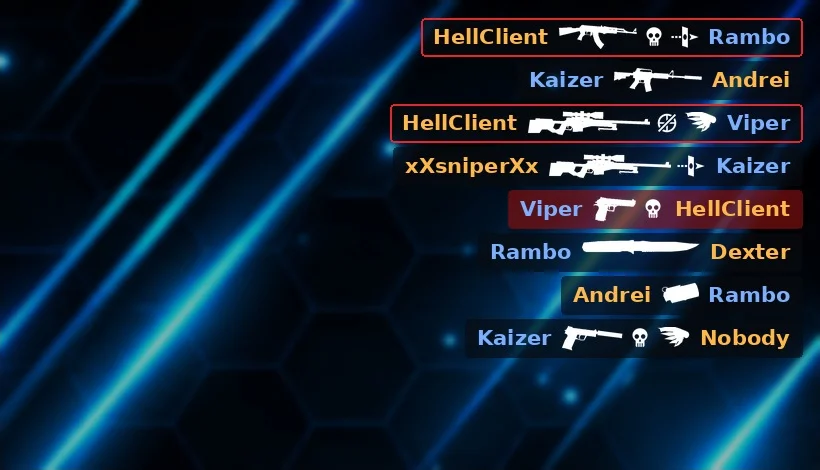
Kill feed
Hell Client replaces the old text list with clear rows: who killed whom, with which weapon and how. Headshots, shots through walls, kills from a jump and no-scopes each get their own icon.
Prefer the original? Turn it off in Options › Hell Client.
Install